Wednesday, 18 January 2012

IR leds and Photo diode

Want to make a line following robot……..? Let’s do it....!
What do you require to make a line follower...?
- Good sensors
- Motors
- And some intelligence....

Let’s see how to make good sensors to follow the line…
As we know that we have to follow the black line on white
surface or white line on black surface… it means we have to
detect white and black surface
So how would be our sensors…?
Our sensors should reflect from any of these surfaces…
As we are using the property of reflection so “Infrared Light
(IR)” would be an ideal choice…Because IR not get affected by other light source


What are you looking at when you think of a line follower??
-It should follow the line as fast and unwavering as possible. Some useful
guidelines are for a line…
-Sensors should be placed as far away from the motors as possible so that
we have enough time to change motor direction.
-The weight of the machine should be evenly balanced
-Construction of the robot and sensor placement will depend upon the speed
of the motors to be used

Wednesday, 4 January 2012

how to interface Lcd 16*2 with microcontroller

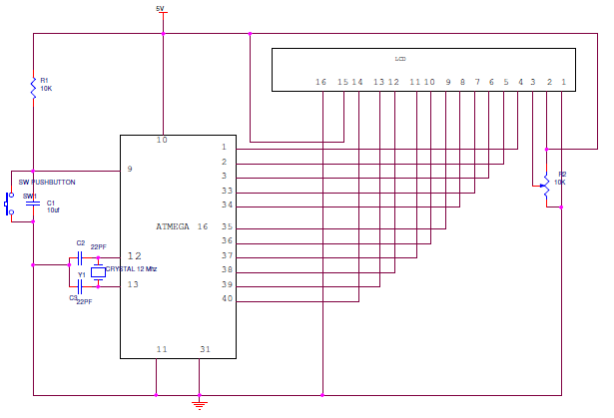
This session completely deals with the interfacing AVR microcontroller (ATMEGA 16) with 16X2 LCD. The Atmega16 belongs to the AVR microcontroller family.

Circuit Diagram of Interfacing 16X2 LCD to AVR Microcontroller:

Interfacing 16X2 LCD to AVR Microcontroller Circuit DiagramCircuit Explanation:
  • Well this is not different from the way interfacing the LCD to 8051 or PIC microcontroller. The crystal oscillator will provide the clock to the microcontroller. The capacitors connected to the crystal will act as filters and help the crystal to resonate and oscillates to its parallel resonate mode.
  •  The potentiometer which is connected to the pin 3 and pin2 of LCD will help to adjust the contrast of the LCD. The 4, 5 and 6 pins of LCD that is Register select, Read/write and Enable pins are connected to the PD0, PD1 and PD2 pins of Atmega16. The data pins of LCD are connected to the pins of 33 to 40 pins of Atmega16.

Programming ATMEGA16 for Interfacing with 16X2 LCD:

You can get the brief information of LCD from the post Interfacing 16×2 from 8051 microcontroller. As I said earlier programming basic is all same expect using the pins and the registers of the microcontroller.
It very important how the data is send to the LCD and how the command is send to the LCD, suppose if you are sending data to the LCD, then you have to make the ENABLE pin of 16×2 LCD pin to low before sending the data, when you think the data you want send is ready make the ENABLE pin again high that is 1 in coding language. If you make ENABLE pin high then only LCD will work.
 Just by making the ENABLE pin high will not work, you have make REGISTER SELECT pin (RS pin) also high so that LCD will accept that it a normal data which has to be displayed on the screen of LCD, if you forgot to make RS pin high it eventually think that user is sending it a command and make it self ready to act according to the command like making cursor to move, clearing the data on the LCD, changing the cursor position etc.
 Last but not least another pin you need to worry of read/write pin, we all know that for any device the basic functionality start with read and write, reading the data and writing the data is main and important function for any peripheral or system. here in the LCD while sending the data for displaying you have to make the R/W pin low, so that LCD will under stand that data should be written on the LCD screen and act accordingly.
Just sending the data and displaying it will not complete the task; arrangement of data in understandable way is the important and crucial task for the programmer. You can arrange the data in the LCD or making the LCD to work according to your wish, can be done by sending the commands or special functions to the LCD, you may think that what type of commands are needed to work for LCD, commands for cursor position, increasing or decreasing the contrast, making the cursor to change line like from first line to second line etc.  To send a command to the LCD you need to make pins high and low just like sending the data. For sending the command you need to make the ENABLE PIN high, REGISTER SELECT pin (RS pin) low that is 0 in programmer terms, and read/write pin (R/W pin) high, you need to remember this configuration for sending the command.
Different commands and there hexadecimal code generally used by the programmer while displaying the data.
SNO
Instruction for LCD
Hex code
1
If you want to display content in one line in 5x7 matrix
0x30
2
If you want to display content in two line in 5x7 matrix
0x38
3
If you display 4 bit data in one line in 5x7 matrix
0x20
4
If you display 4 bit data in two line in 5x7 matrix
0x28
5
entry mode
0x06
6
To clear the display without clearing the ram content
0x08
7
Making the cursor on and also display on
0x0E
8
Making the cursor off and also display off
0x0C
9
Displaying the data on cursor blinking
0x0F
10
Shifting complete display data to left side
0x18
11
Shifting complete display data to right side
0x1C
12
Moving cursor to one place or one character left
0x10
13
Moving cursor to one place or one character RIGHT
0x14
14
Clearing the complete display including RAM DATA
0x01
15
Set DDRAM address on cursor position
0x80+add
If we want to talk in brief for displaying data in LCD
  • E=1; enable pin should be high
  • RS=1; Register select should be high
  • R/W=0; Read/Write pin should be low.
For sending command to LCD
  • E=1; enable pin should be high
  • RS=0; Register select should be low
  • R/W=1; Read/Write pin should be high.
When you are passing a string, its better use a string pointer and increment the pointer, if you are incrementing a pointer it will automatically go the next address of the variable in which you can store your character which you wanted to display. See the below example.
void write_string(unsigned char *str)   //store address value of the string in pointer *str
{
int i=0;
while(strng[i]!=’\0′)  // loop will go on till the NULL character in the string 
               {
                              lcd_write(strng[i]);// sending data on LCD byte by byte
                              i++;
               }
               return;
}

Code for Interfacing the LCD to ATMEGA16:

LCD DATA port----PORT B
signal port------PORT D
               rs-------PD0
               rw-------PD1
               en-------PD2
*/
#define LCD_DATA PORTB                //LCD data port
#define ctrl PORTD
#define en PD2                         // enable signal
#define rw PD1                       // read/write signal
#define rs PD0                     // register select signal
void LCD_cmd(unsigned char cmd);
void init_LCD(void);
void LCD_write(unsigned char data);
int main()
{
DDRB=0xff;                                  // setting the port B
DDRD=0×07;                                // setting for port D
init_LCD();                                 // initialization of LCD
_delay_ms(50);                        // delay of 50 mili seconds
LCD_write_string(“hello world”);                      // function to print string on LCD
return 0;
}
void init_LCD(void)
{
LCD_cmd(0×38);                            // initialization of 16X2 LCD in 8bit mode
_delay_ms(1);
LCD_cmd(0×01);                                 // clear LCD
_delay_ms(1);
LCD_cmd(0x0E);                        // cursor ON
_delay_ms(1);
LCD_cmd(0×80);                     // —8 go to first line and –0 is for 0th position
_delay_ms(1);
return;
}
void LCD_cmd(unsigned char cmd)
{
LCD_DATA=cmd;
ctrl =(0<<rs)|(0<<rw)|(1<<en);
_delay_ms(1);
ctrl =(0<<rs)|(0<<rw)|(0<<en);
_delay_ms(50);
return;
}
void LCD_write(unsigned char data)
{
LCD_DATA= data;
ctrl = (1<<rs)|(0<<rw)|(1<<en);
_delay_ms(1);
ctrl = (1<<rs)|(0<<rw)|(0<<en);
_delay_ms(50);
return ;
}
void LCD_write_string(unsigned char *str)             //store address value of the string in pointer *str
{
int i=0;
while(str[i]!=’\0′)                               // loop will go on till the NULL character in the string
{
LCD_write(str[i]);                            // sending data on LCD byte by byte
i++;
}
return;
}

Your own 4*4 matrix keypad

Interface 4×4 Matrix Keypad With Microcontroller


Why Matrix Keypad?

Typically one port pin is required to read a digital input into the controller. When there are a lot of digital input that has to be read, it is not feasible to allocate one pin for each of them. This is when a matrix keypad arrangement is used to reduce the pin.
Therefore, the number of pins that are required to interface a given number of inputs decreases with increase in the order of the matrix.
4x4 matrix keypad featured image
Example: If the matrix is 2×2, you will need 2 pins for the rows and 2 pins for the columns in such a case there is no difference in the cost of reading that many inputs. But if you consider a 10×10 matrix you will just need 20 pins (10 for the rows and 10 for the columns) to read 100 digital inputs.

Matrix Keypad Interface Logic

Initially all switches are assumed to be released. So there is no connection between the rows and columns. When any one of the switches are pressed, the corresponding rows and columns are connected (short circuited). This will drive that column pin (initially high) low. Using this logic, the button press can be detected. The colors red and black is for logic high and low respectively.  Here are the steps involved in determining the key that was pressed.

Step 1:

The first step involved in interfacing the matrix keypad is to write all logic 0′s to the rows and all logic 1′s to the columns. In the image, black line symbolizes logic 0 and red line symbolizes logic 1.
For now let us assume that, the circled key is pressed and see how the key press can be detected by a software routine.
Wiring diagram

Step 2:

Now the software has to scan the pins connected to columns of the keypad. If it detects a logic 0 in any one of the columns, then a key press was made in that column. This is because the event of the switch press shorts the C2 line with R2. Hence C2 is driven low.
Note: color of the lines indicate the logic values they return.
step 3

Step 3:

Once the column corresponding to the key pressed is located, the next thing that the software has to do is to start writing logic 1′s to the rows sequentially (one after the other) and check if C2 become high. The logic is that if a button in that row was pressed, then the value written to that row will be reflected in determined column (C2) as they are short circuited. Note: color of the lines indicate the logic values they return.
step 4

Step 4:

The procedure is followed till C2 goes high with logic high is written to a row. In this case, a logic high to the second row will be reflected in the second column.
Note: color of the lines indicate the logic values they return.
Step 5
We already know the key press happened at column 2. Now we have detected that the key is in row 2. So, the position of the key in the matrix is (2,2)
Once this is detected, its up to us to name it or provide it with a task in the event of the key press.

Implementation with C

Now lets see how the above logic can be implemented in embedded C. Here is the program I wrote to test it. This code is for PIC microcontrollers with c18 lite version compiler. I as usual, used a lot of macros so if you are an Arduino user you could easily make some alterations to the code and use it. The basic concept for keypad scan is inside the while(1) loop.
The above program is done with polling and utilizes the entire time of the controller to scan the keypad and display the data on the 7 segment displays. There is a cool feature on Microcontrollers called as the Interrupt on Change (IOC). As the name suggests, the controller will interrupt if it finds any change in a port. In PIC the whole of PORT B has this feature. By using the feature without any change in the hardware setup we can scan the keypad in the ISR and have more of the controllers time to do some thing useful.

Pages